iRobot Roomba 405 Combo with AutoWash Dock Review UK 2026

Quick verdict
Score: 6.6/10
Best for: hands-off cleaning, as the dock empties the bin and washes the mop, and multi-room homes where room-by-room mapping helps
Not for: small flats with little floor space for a large dock
Bottom line: A premium robot vacuum and mop with a self-emptying dock, offering LiDAR navigation.
Sometimes, a "combo" robot vacuum-mop setup like the iRobot G185 Roomba 405 with the AutoWash dock makes sense because it can switch tasks, though the dock handles cleaning of the mopping system. The quick verdict is mixed. For day-to-day floors, it offers practical mopping cycles, and vacuum runs can follow without user resets. However, cleaning results depend on using the right approved solution, and using unauthorised liquids may risk warranty issues. It also needs careful water-only setup, with no hot water, to avoid reliability issues.
Key facts
- It uses LiDAR (laser) navigation to map your home, so it cleans in neat rows and lets you send it to one room or set no-go zones in the app.
- Obstacle avoidance helps it steer around cables, socks and pet bowls instead of getting stuck on them.
- It mops as well as vacuums, and its dock washes the mop so it doesn't go musty between runs.
- Its self-emptying dock sucks the dust out of the robot after each run, and the listing says the bag or bin holds up to 75 days of debris, so you rarely touch the dirt yourself.
- It is controlled from a phone app and works with voice assistants, so you can start, schedule or stop a clean from anywhere.
Taken from the manufacturer's Amazon UK listing, checked 2026-11-09.
Key specifications
| Specification | Detail |
|---|---|
| Navigation | LiDAR (laser) |
| Mopping | Yes, with mop washing |
| Self-emptying dock | Yes, up to 75 days |
| Obstacle avoidance | Yes |
| App control | Yes, plus voice assistants |
Pros
- Up to 120 minutes run-time
- Self-empty dock - weeks between bag changes
- Vacuum and mop in one
- LiDAR laser navigation for systematic cleaning
Cons
- Struggles with floor clutter, cables and deep high-pile carpet
- Sensors and brushes need regular cleaning to keep performing
Not sure the iRobot Roomba 405 Combo with AutoWash Dock is right for you? Alternatives to consider
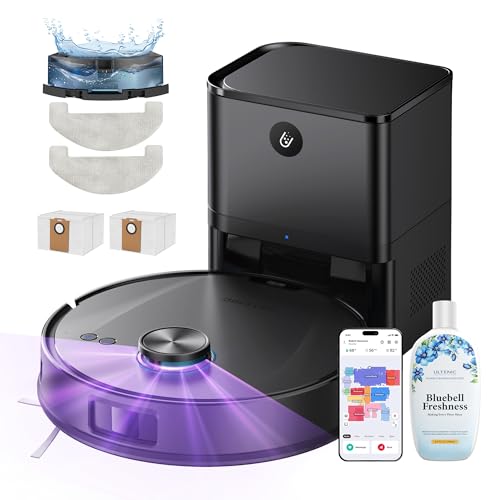
Ultenic T20 Pro+ Robot Vacuum Cleaner With Mop
Best for Homes wanting hands-off floor cleaning on hard floors and carpet, with mopping and self-empty dock.
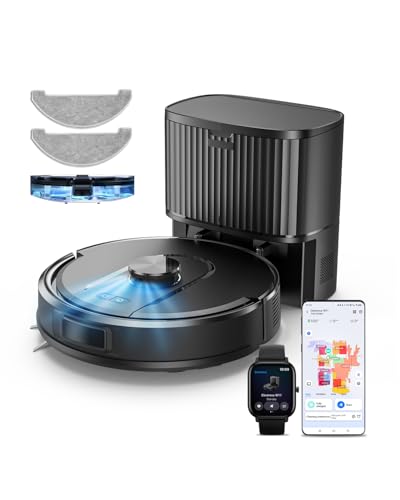
Vexilar Cleanova W11 Self-Emptying Robot Vacuum Cleaner With Mop
Best for Homes wanting hands-off floor cleaning on hard floors and carpet, with mopping and self-empty dock.
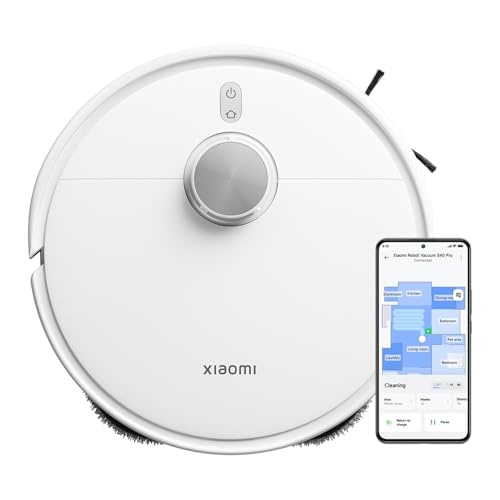
Xiaomi S40 Pro Robot Vacuum & Mop 2-in-1
Best for hard-floored homes that want vacuuming and light mopping, and homes with pets, thanks to strong suction and an anti-tangle brush.
Suction Power and Cleaning Performance
Suction power and cleaning performance determine how well this robot vacuum Combo lifts dust before it switches to mopping, and this matters most on carpets, edges and high-traffic lanes. In typical use, this model pulls loose debris well from low pile carpets and collects more grit along baseboards when furniture is kept slightly spaced. Corners may need a second pass because brushes and suction can miss compacted dust, particularly on thick rugs. After vacuuming, the mopping phase runs with less airborne debris, but mopping results depend on drying time.
Navigation and Mapping
The IRobot uses LiDAR (laser) navigation to map your home, so it cleans in neat rows and lets you send it to one room or set no-go zones in the app. Obstacle avoidance helps it steer around cables, socks and pet bowls instead of getting stuck on them.
Navigation in the iRobot Combo relies on onboard sensors and a planned cleaning pattern to move through rooms efficiently, switching from vacuuming to mopping once it reaches the mapped area. The robot scans walls and obstacles, then charts a route that prioritises coverage over random passes. Users may see it clean in neat lines as it repositions around furniture legs and cables. Mapping accuracy can drop in cluttered, highly reflective, or very dark spaces, since sensor readings drive updates.
Battery Life and Run Time
Battery life on the robot vacuum is typically sufficient for cleaning a small-to-medium home in a single session, as the robot can vacuum and then switch to mopping after it reaches the mapped zones. With the AutoWash dock, a standard cycle often completes in one go where floors are mostly open. In cluttered rooms, runtime can be reduced due to more obstacles and slower navigation. When the battery charge drops, the robot returns to the AutoWash dock to recharge and refresh. For larger areas, repeat passes may be needed, particularly around thick rugs and in tighter corners.
Mop Function
The IRobot mops as well as vacuums, and its dock washes the mop so it doesn't go musty between runs.
After the vacuum phase finishes and the robot returns to its mapped cleaning zones, the Mop Function begins wet-cleaning by switching from vacuuming to mopping. The AutoWash dock refills and refreshes the system, dispensing the approved concentrate and topping up clean water depending on the selected solution. Using the same mapping, the robot moves in steady passes over hard floors. Expect improved pickup of light stains, although results vary with grout depth and sticky residue. For warranty safety, only authorised cleaning solutions should be used, and hot water should be avoided.
Self-Empty and Maintenance
Its self-emptying dock sucks the dust out of the robot after each run, and the listing says the bag or bin holds up to 75 days of debris, so you rarely touch the dirt yourself.
Once the self-empty cycle finishes, routine care becomes the priority for both the robot vacuum and the AutoWash dock, because clean parts help maintain suction and prevent odour build-up. A robot vacuum self-empty workflow reduces how often emptying is required, but filters still need checks, and the dock waste bin must be kept dry. Inspect the bin area weekly, wipe the sensor windows with a dry cloth, and check the brushes for hair tangles. The AutoWash dock also needs periodic rinses, and any cleaning solution must follow the approved instructions, since unauthorised products may corrode parts and void warranty.
App Control and Smart Features
The IRobot is controlled from a phone app and works with voice assistants, so you can start, schedule or stop a clean from anywhere.
App control and smart features allow owners to manage the Roomba and the AutoWash dock from a phone via iRobot's companion app. The app supports scheduling, start or stop commands, and status checks including battery level and cleaning progress, as well as monitoring dock wash activity. It also issues alerts when filters need attention. Setup can take several minutes during initial pairing, and smart features depend on Wi-Fi stability.
Noise Level
Noise levels from the iRobot are usually noticeable, but they are typically not extreme for a home robot vacuum. In everyday use, it produces a steady operating hum, plus brush and dock sounds during charging. It runs more quietly on open floors, with noise rising slightly when it bumps into edges or changes direction. During AutoWash dock cycles, the unit can sound louder for a short time, so scheduling those cycles can help if the robot is left to run while you are in another room.
Pet Hair Performance
Pet hair performance on the robot vacuum is commonly best on hard, open areas, because the main brush and suction can lift loose fur before it mats into carpet fibres. With the irobot g185 roomba 405 combo + autowash dock robot vacuum cleaner uk, pet hair tends to collect quickly along edges, where the side movement helps sweep it inward. As a robot vacuum for pet hair, it handles light shedding well on low-pile rugs, but deeper carpet can hold onto hair, requiring more passes and wider coverage. Overall, results improve when pets shed frequently, yet stubborn clumps remain a weak spot.
Cleaning and Maintenance
Cleaning and maintenance help the iRobot G185 Roomba 405 work well over time, particularly when it is used on mixed floors and clears everyday debris daily. Routine care keeps airflow steady: empty the bin when full, rinse the filter when needed, and wipe the sensors with a dry cloth. For the dock area, the dock tank should be filled only with approved products. The recommended approach is to use "Just Water" with no hot water or vinegar, and to follow the stated cap or pour amounts.
Who Is This Robot Vacuum For?
Who is the iRobot + AutoWash Dock best suited for in the UK market, following iRobot's North America guidance? It fits people who want one unit for daily vacuuming and scheduled mopping, and who have mostly hard floors and light to medium dirt. It is a practical choice for small homes, apartments, and busy households that prefer automated cleaning cycles. For buyers comparing iRobot g185 Roomba 405 Combo + AutoWash Dock robot vacuum cleaner vs. Other combos, it makes sense when they accept dock-based washing routines and use only approved solutions. It suits cautious owners who will measure concentrates, such as 2 caps in AutoWash.
Where to Buy in the UK
Finding where to buy the robot vacuum Combo plus AutoWash Dock in the UK is easiest through iRobot's own store and major UK online retailers. For the iRobot Combo plus AutoWash Dock robot vacuum cleaner best price UK, shoppers can compare current listings across Amazon UK, John Lewis, Currys, AO, and Argos, and then check the seller details, delivery dates, and returns information shown on each product page. When purchasing as a bundle, the Combo dock model number should match the listing details, and third-party "cleaning" add-ons should be avoided to reduce warranty risk.
Frequently Asked Questions
Is the robot vacuum worth it?
A robot vacuum like this robot vacuum earns its place for day-to-day floor upkeep, freeing you from routine vacuuming and damp-mopping hard floors. Its self-empty dock means weeks between bag changes. It handles upkeep rather than deep cleans - check the current Amazon UK price, as it changes often.
Can the iRobot mop as well as vacuum?
The IRobot mops as well as vacuums, and its dock washes the mop so it doesn't go musty between runs. Yes - the iRobot G185 Roomba 405 vacuums and damp-mops hard floors in one run. Mopping suits sealed hard floors, not carpet, and is best for light daily marks rather than stuck-on stains.
What are the downsides of the robot vacuum?
Robot vacuums struggle with floor clutter, loose cables and deep high-pile carpet, and the brushes, filter and sensors need regular cleaning. They are for routine upkeep, not a replacement for an occasional deep clean.
Is this robot vacuum good for pet hair?
The iRobot is designed to lift pet hair from hard floors and low-pile carpet; long-haired pets may still need a periodic brush clean to clear tangles.
Does the robot vacuum empty itself?
Its self-emptying dock sucks the dust out of the robot after each run, and the listing says the bag or bin holds up to 75 days of debris, so you rarely touch the dirt yourself. Yes - the iRobot comes with a self-empty dock, so the onboard bin is emptied automatically and you only deal with the larger base bag every few weeks.
How does the robot vacuum navigate?
The IRobot uses LiDAR (laser) navigation to map your home, so it cleans in neat rows and lets you send it to one room or set no-go zones in the app. The iRobot G185 Roomba 405 uses LiDAR laser navigation to map rooms and plan an efficient path, rather than bouncing around at random.
How long does this robot vacuum run on a charge?
It runs for up to 120 minutes per charge, then resumes after recharging on longer cleans. Real run-time depends on suction level and floor type.
Does the iRobot work on both carpet and hard floors?
Yes - it moves between hard floors and low-to-medium carpet automatically, though mopping is for hard floors only. Deep or high-pile carpet is the main limitation for any robot vacuum.